
425: Boldly Gone
All the updates and releases!
Security, and updates and lots of new hardware with long designators!
Sponsor

Effortless Vulnerability Management with Alectrona Patch
Manual patching is slow, inconsistent, and leaves security gaps. Alectrona Patch
Stop chasing vulnerabilities—fix them automatically with Alectrona Patch for Mac. Unpatched software is one of the biggest sources of endpoint vulnerabilities. Stay ahead of those risks. With Alectrona Patch, you can install and update over 1500 Mac applications automatically to keep your users protected with the latest security updates.
Learn more and set up a free trial at alectrona.com/patch
Updates with many descriptive monikers
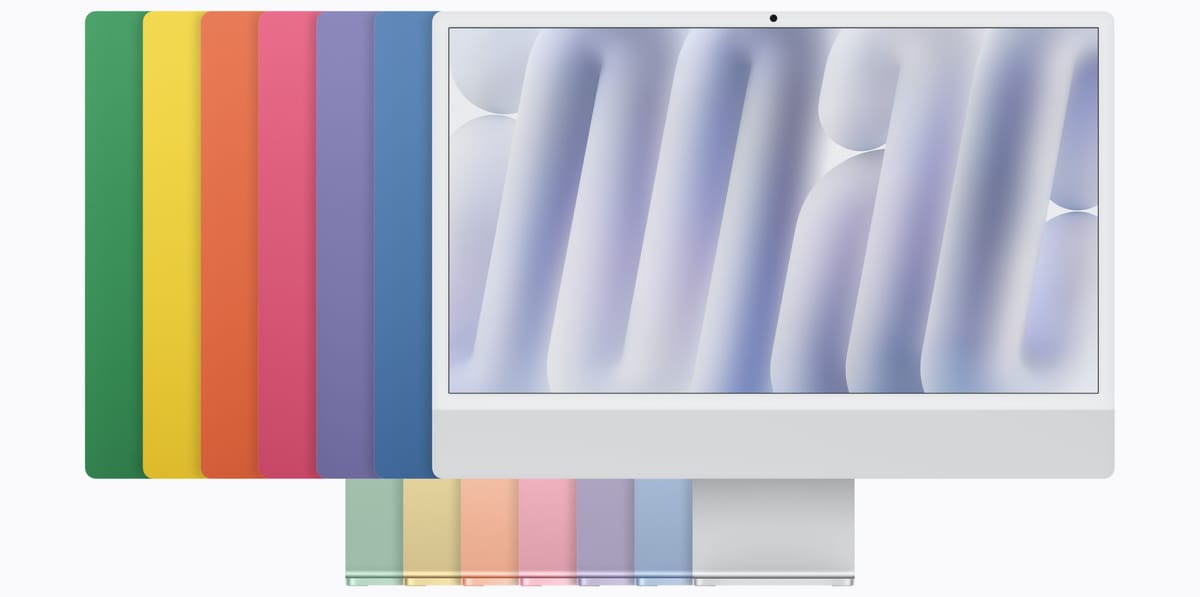
Apple had quite the week. We got the 27.2 updates, as expected, as well as a new iPad mini (only in two “colors”), new iMacs with M6 (but retaining the old colors), a new MacBook Pro 14” with M6, and (deep breath) a new “MacBook Pro with PROLED XDR Display and Touch.” They also teased Creator Studio updates next month.
The new “MacBook Pro with PROLED XDR Display” (yes, that is the official moniker) has M5 Pro or M5 Max chips and extends the MacBook Pro line, pricing above the MacBook Pro 14” with M6 and the MacBook Pro 14” and 16” with M5 Pro or M5 Max.
Apple really needs to improve how they label and distinguish their MacBooks. If the desktop Mac line followed a similar naming scheme we’d have the “Mac Pro with M6,” “Mac Pro with M5 Pro,” (the Macs mini) “Mac Pro with M5 Max,” “Mac Pro with M5 Ultra,” (the Macs Studio), and “Mac Pro 24” 4.5K Display with M6.” (iMac) If the “Pro” moniker is good enough for the MacBook Pro 14” with M6, it should be good enough for the iMac, Mac mini, and the MacBook Air. (“MacBook Air Pro 13” or 15” with M5”) Maybe not the MacBook Neo, even though that has the “Pro” in the chip moniker (“A18 Pro”)
After naming the MacBook Neo (instead of “MacBook 13” with A18 Pro”) the 5 trillion dollar company seems to have run out of creativity. The lack of such is also apparent in the re-branded Apple Music logo and app icon, which is… a black note on a white squircle. Not that the previous design (white note on a red background) suffered from an abundance of creativity, but at least the color stood out. I have a hard time recognizing and locating the black and white icon in the dock or the home screen.
Did I mention the (inhale) MacBook Pro with PROLED XDR Display has a touch display? This means that macOS 27.2 now supports Touch interactions on Mac. I assume Apple will slowly introduce touch screens to lower priced MacBooks (and possibly even the iMac and Studio Displays?) over the next few years, so developers and users will have some time to get used to the new interactions and fiinger prints. The new MacBook displays also have overall improved display characteristics, feature a “dynamic island” rather than a notch (complete with live actions on macOS), and are slightly smaller and noticably lighter.
Also, (and I adore this very much) the Apple logo on the back of the display glows again!
Naming aside, these are good improvments overall. I am uncertain many will consider these improvements essential enough to pay the extra price, especially following the recent overall price increases. Apple doesn’t seem so sure, either, because the previous MacBook Pro 14” and 16” with M5 Pro and M5 Max remain available at their previous (increased) price points.
All of this isn’t so unusal: Apple followed a similar playbook when the MacBooks and iMacs with Retina displays were introduced.
I also have some questions on what distinguishes the iPad line from MacBooks that have touch interface and iPhones that can run multiple apps side by side, and support pen input?
Also, the first iPod was released 25 years ago this week. No official recognition from Apple, but someone put a working iPod classic in the “Page not found” page of Apple Music on the web.
Boldly Gone
Rest in peace, Sir Patrick Stewart. Always my favorite Captain.
Also, Walter Koenig, aka Pavel Chekov, passed earlier this week. Sad week for Trekkies.
📰 News and Opinion
Sorry, new developers, it’s vibecodetown
Glenn Fleischmann, Six Colors:
Rather, my concern is whether vibe coding creates a flood of apps that overwhelms the ecosystem’s ability to absorb new, good ones. By some measures, it already has. Some vibe-coded apps are or will be great, but the sheer volume of mediocre, unsafe, or buggy ones is the issue.
I get these emails, too, but so far, none have been for Mac Admins related apps. Nevertheless, you will have noticed that the list of apps in Updates section has been growing and I suspect many of the tools are vibe-coded. Like Glenn, says in his post, I don’t have a problem with that per se, and believe that the community will identify the good tools over time, and those that don’t get attention will wither away.
While I haven’t gotten email spam for Mac Admin tools yet, I have seen an increase of posts on Mac Admins Slack promoting new tools and repos. I do want to point out that the Code of Conduct prohibits such promotion, unless it is relevant to the discussion at hand.
⚙️ Apple Updates
macOS
- macOS 27.2 Golden Gate (26B123): What’s new, Developer Release Notes, Security, Enterprise, Compatibility, IPSW, Installer PKG
- macOS Tahoe 26.7.2 (25G332): What's new, Security
- macOS Sequoia 15.8.2 (24H232): What's new, Security
iOS and iPadOS
- iOS 27.2: About, Enterprise
- iPad OS 27.2: About, Enterprise
- iOS and iPadOS 27.2: Developer Release Notes
- Security: 27.2 26.7.2, 18.7.11
Other Platforms and Apps
- visionOS 27.2: About, Developer Release Notes, Security, Enterprise
- watchOS 27.2: About, Developer Release Notes, Security
- tvOS 27.2 (and 26.6.1): About, Developer Release Notes, Security
- HomePod Software 27.2: About
- Safari 27.2: WebKit Features, Developer Release Notes, Security
- Xcode 27.2: Mac App Store, Developer Downloads, Developer Release Notes, Security Documentation
Guides
- Apple Business: User Guide, Revision history
- Apple School Manager: User Guide, Revision history
- Apple School Manager and Apple Business APIs changelog
- Apple Platform Certifications: Welcome, Revision history
Community and Blogs
- Howard Oakley: Apple has just released updates to Golden Gate 27.2, 26.7.2. and 15.8.2
- Mr Macintosh: macOS Golden Gate 27.2 Update! Everything you need to know.
- Hartley Chelton, MacRumors: macOS 27.2 Stops Upgrades From Removing Rosetta
🔐 Security and Privacy
About the compromised eMudhra intermediate CAs
Apple Support:
On 19 October 2026, Apple began blocking these 12 certificates on Apple devices.
[…]
If you use Terminal as part of your workflow (such as system administrators or developers), you might use command-line tools that can still accept these certificates.
[…]
Apple is making further changes to block these certificates in other places on Mac where software checks certificates, such as the command-line tools included with macOS or the Xcode Command Line Tools that use /etc/ssl/cert.pem. These changes will be available in a future software update, and you won't need to edit any files to get them.
Note that if you follow the instructions to remove the certificates from cert.pem , a software update (like those published this week) might replace the original file. (until Apple releases the update which fixes this for good in the “future software update”)
See also:
- Dan Snelson: Remediating eMudhra's private key compromise with Jamf Pro
- Howard Oakley: Do you ever use curl? How recent vulnerabilities could affect you
- Michael Tsai: eMudhra Intermediate CA Compromise
Operation IXIM: Preventing a botnet of millions of Popcorn Time users - Eye Research
Eye Research:
Between November 2025 and March 2026, Eye Research actively disabled the vulnerable update mechanism used by the popular download client Popcorn Time (Time4Popcorn).
Official Claude Code Extension Compromise: Security Advisory
Calum Hall, Phorion:
Phorion has detected a backdoor in the official Claude Code for VS Code extension bundle on the Cursor Marketplace that drops a persistent SSH backdoor across macOS, Linux, and Windows.
🔨 Support and Tutorials
Why Do I have 2147483647 Licenses of an App?
Tom Bridge:
Beginning this past week, your license manager in your device management system might be showing you a value that just plain sounds crazy.
Why Zentral uses Terraform for config-as-code and GitOps
Éric Falconnier, Zentral Blog:
There were two ways to build it ourselves, and we looked at both.
♻️ Updates and Releases
- mSCP 2.0, Release 27.1
- Munki 7.4
- Jamf Compliance Editor v2.0.1
- Setup Checklist 1.1.1
- MACE v1.2.4, v1.3.0-beta.1
- Third Party Patcher 1.5.5
- Monocle "B" as in bdellium
- PrefWatch v.1.5.2
- The Onboarding Tool v2.6.3 Beta
- Jamf Reports v2.11.0 (blog post)
- Terraform Provider Jamf Platform v1.7.2
- jamf-cli v1.35.0
- JamfDash 1.0
- SUMB 2.0.2
- DDM OS Reminder 5.3.0
- Checkpoint 2.8.1
- ScopeMap v2.0
- Box of Apples-1.3.4
- super 6.0.0-beta4
📺 Watch
October 2026 – MacAdmins Meeting Archived
Marriott Library - Apple Infrastructure:
- Jamf The Doctor – Isaac Ordonez, Mann Consulting
- Jamf Nation User Conference 2026 Recap – William Smith, Jamf
- XPSSO – Timothy Perfitt, Twocanoes Software
🎧 Listen
Authenticated Guest Mode, Platform SSO, and more
Mac Admins Podcast:
Backing up the World Premieres from MSA 2026, we’re talking Platform SSO with Joel Rennich, the people who know the most about it.
JNUC recap, Golden Gate, Rosetta, and more
Apple @ Work:
Alan West joins the show to talk about his JNUC experience, macOS Golden Gate, and more.
Workbrew 2.0
Mac Admins Podcast:
We’ve got John from their team to talk through all the new things that are coming as we adapt to the 27 releases from Apple and await our new hardware!
🎈 Just For Fun
Announcing WindowShade Redux 1.0*!
Rosyna Keller:
A beloved piece of software returns for modern macOS and modern security expectations. WindowShade your windows! Minimize windows in place! Float your windows above all others!
This joins Rosyna’s other totally delightful software that return some classic MacOS features: FruitMenu Redux and Xounds Redux